Top Lords Battle Planning Guide
Plan Gold Mine Conquest and other alliance battles: collect availability, build the roster, assign objectives and record attendance and points.
Battles under Events & strategy plans an alliance battle from sign-up to score. Gold Mine Conquest is built in; other battle types are yours to define.
1. Check the battle type
Open Settings → Battles. Gold Mine Conquest comes with 20 registered Lords, no substitutes, teams off, Battlefield Points as the score and a reliability window of 10 recent battles. Add your own types with a name, registered and substitute places, team names, a score label, a reliability window and up to 40 objectives, one per line.
2. Create the battle
Create a battle with its type, the date and time in UTC and the opponent alliance, plus notes if you need them. Verified members see upcoming battles on My Lord and answer Available, Maybe or Unavailable, with an optional note. An answer never gives anyone a place by itself.
3. Build the roster
- Press Suggest roster. It keeps the places you already set and fills the open ones from members who answered Available, ordered by R1–R5 rank and then by the strength you choose: Lord power, hero power or a squad's power.
- Change the draft by hand. Officers can add any active Lord, whatever their answer.
- Press Review and save roster. Lords whose place changed get a notice in the app.
Save template keeps a roster for its battle type; load it next time and review it before saving.
4. Assign objectives
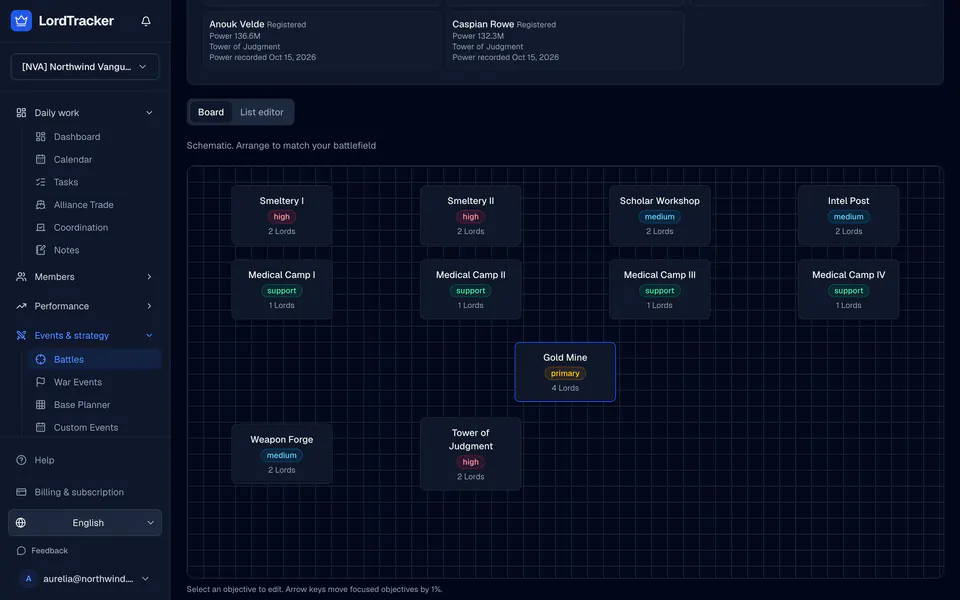
Open Tactical planner. Gold Mine Conquest shows the Gold Mine, Smeltery I and II, the Scholar Workshop, the Intel Post, Medical Camps I to IV, the Weapon Forge and the Tower of Judgment on a schematic board. Arrange it to match your battlefield.
- Select an objective and set its priority: primary, high, medium or support.
- Drag Lords onto objectives, or use Preview auto-assign to fill them by strength. Locked objectives keep their Lords.
- Save the plan, then Share with members. Each assigned Lord sees their own objective and priority; officer notes stay private.
5. Record the result
After the battle starts, record win, loss or draw and both scores. In the roster table, set Attended, No-show, Excused or Unknown and each Lord's score, then press Save results once. A score never marks a Lord as present on its own.
Import CSV accepts name, role, team, attendance and score columns; export first to see the format. You can also import result screenshots and review them.
6. Read reliability
Reliability is battles attended divided by battles attended plus no-shows, over a Lord's most recent battles. Excused and unknown records are left out. It shows on the battle page, on Lord profiles and on My Lord, and Cargo Ship Captain pools can use it.
Read the battle planner page for the overview, and link battles to events with the calendar guide.