Top Lords Kingdom Map Scan Guide
Start a kingdom map scan, follow its progress, search castles by Lord, alliance tag or coordinates and read the coverage of a finished scan.
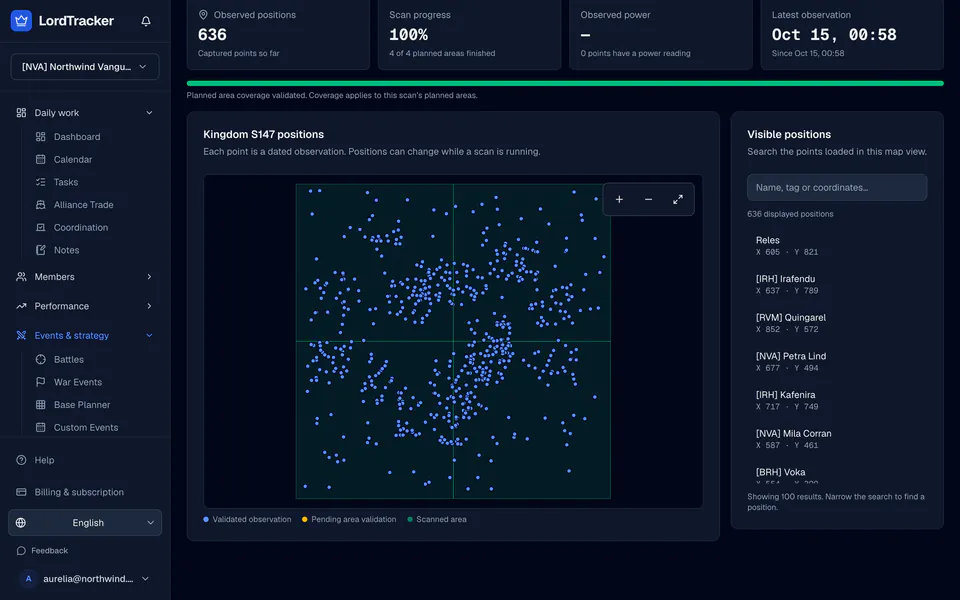
The Kingdom map under Events & strategy shows where castles sit in your kingdom, from dated scans. Starting a scan needs Pro, Server Bundle or the 7-day Pro trial and an officer role; everyone with access to the alliance can view the latest map.
1. Check that your kingdom can be scanned
Open Kingdom map. If the page says the map is not available for your kingdom yet, our collection fleet does not cover that kingdom. Your rankings, rosters and auto-sync work as usual; check again later.
2. Start a scan
Press Start scan. LordTracker plans your kingdom as a set of areas and hands them to the collection service. The scan runs there, not in your browser, so you can close the page.
If a scan never starts, the page says Scan not started and you can start it again. Cancel scan stops a running scan.
3. Follow the progress
Positions appear as soon as the first area arrives. The page shows how many planned areas have finished and how many positions were captured so far. Areas still being checked are marked as pending, and areas not read yet are marked as unscanned.
4. Find a castle
Pan by dragging and use the zoom controls; Fit observed map shows everything again. Search by Lord name, alliance tag or coordinates among the positions loaded in the view, and select a point to see its Lord, tag, castle level, coordinates and the time it was seen. A list of the positions follows the map for keyboard and screen-reader use.
5. Read the coverage
When the scan finishes, the page says whether the planned area coverage was validated. A partial scan marks the areas it could not read as unknown, never as empty. Each point is a dated observation: castles can move during a scan and after it.
6. Scan again
Press Scan again when you need a fresh picture, for example before a relocation or after a war. Compare it with the kingdom ranking to see how strong the alliances around you are, and plan your own layout with the base planner.
The kingdom map page explains what scans include on each plan.