Top Lords kingdom map. Every castle, dated.
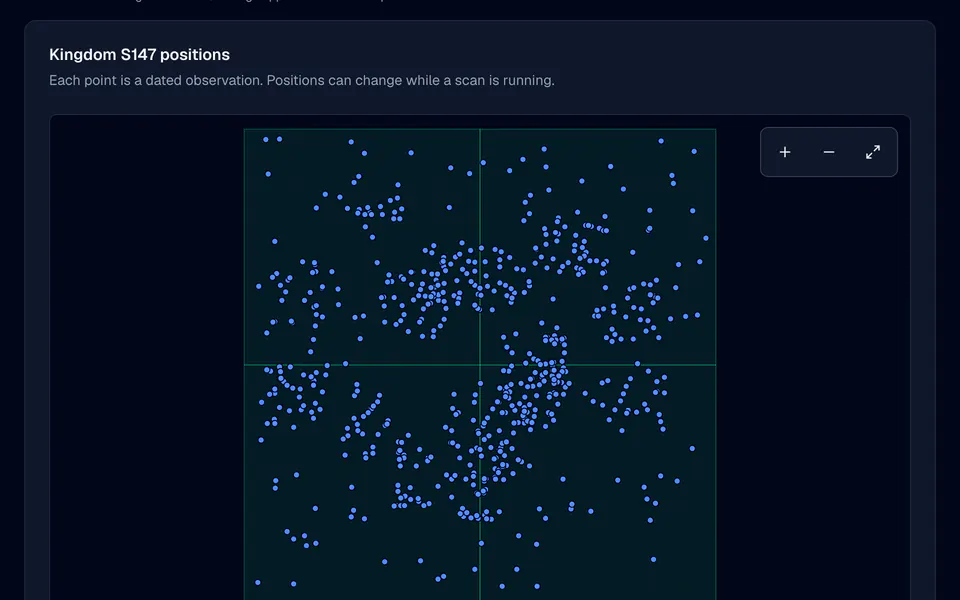
Start a scan and LordTracker reads your whole kingdom's map, area by area, and plots every castle it finds with its Lord, alliance tag and level. Positions appear while the scan is still running, and every point keeps the time it was seen.
- Whole-kingdom scans in planned areas
- Positions appear while the scan runs
- Search by Lord, tag or coordinates
- Pro, Server Bundle and the Pro trial
- 7-day Pro trial, no card
- Members and officers free
- From €14.99 / month
- Cancel anytime
Your kingdom, from one scan.
The map answers the questions that come before a move: where are we, where are they, and how much room is there between us?
Alliance territory
Every headquarters the scan finds becomes a point on the map, grouped by alliance tag, so clusters and borders are visible at a glance.
Lord details
Select a point to see the Lord's name, alliance tag, castle level and coordinates, with a power reading where the scan returned one.
Search the map
Find a Lord, an alliance tag or a coordinate among the loaded positions, and jump straight to it.
Live progress
A scan is split into planned areas. The page counts the finished ones and draws positions as soon as the first area arrives, long before the scan ends.
Honest coverage
Each area is checked before it counts as covered. A partial scan marks the areas it could not read as unknown, never as empty.
Survives a closed tab
Scans run on our collection service, not in your browser. Close the page, come back later, and the results and the progress are still there.
Start a scan, watch it fill in.
Open the map
In your alliance, open Events & strategy, then Kingdom map. The page shows the latest scan, or that no scan has run yet.
Start the scan
An officer on Pro or Server Bundle presses Start scan. LordTracker plans the areas of your kingdom and hands them to the collection service.
Watch the areas arrive
Positions appear area by area with a progress count. Pan, zoom and search while the scan is still running.
Use the dated result
The finished map keeps its scan time. Scan again when you need a fresh picture, for example before a move or after a war.
Positions next to the power ranking.
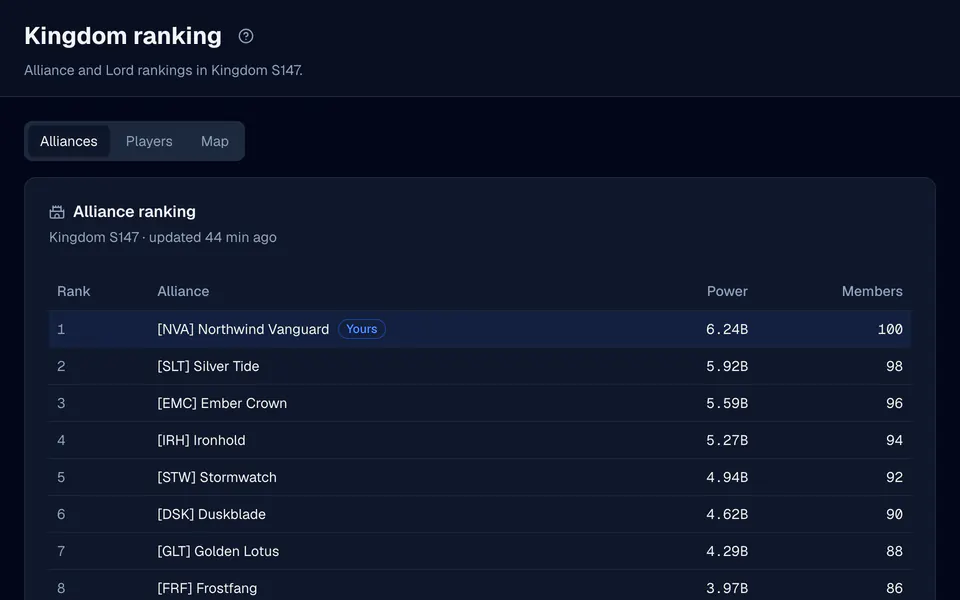
The map sits beside your kingdom's official alliance ranking, so you can compare where an alliance is with how strong it is.
- Rankings on every planThe kingdom's official alliance and Lord rankings are part of every plan and are collected every hour.
- Rank, power and membersThe ranking lists every captured alliance with its rank, power and member count, and the map shows where that power sits. For a rival's power over time, open its free public kingdom page.
- Free public pagesEvery tracked kingdom has a free public ranking page. Map scans stay private to your alliance.
Before the move, not after it.
Plan a relocation
Look for open space near your allies before anyone moves, and check which alliances already sit along the way.
Read a rival's footprint
See how tightly an alliance is grouped and where its highest-level castles are, from real coordinates instead of memory and screenshots.
Brief your officers
Search a Lord or a tag and share the exact coordinates in chat, so everyone talks about the same castle.
Check after a war
Scan again after a fight or a migration and compare the new picture with what you knew before.
What a scan can and cannot tell you.
A picture, not a live feed
A scan shows positions at the time each area was read. Castles can move while a scan runs and after it ends, which is why every point keeps its time.
Kingdoms we can scan
Scans run in the kingdoms our collection fleet covers. If yours is not covered yet, the map page says so, and your rankings, rosters and auto-sync are not affected.
No game art
The map draws positions on a plain grid. It does not copy the game's map art, troops or marches.
Questions, answered.
How does the Top Lords kingdom map work?
Which plans include kingdom map scans?
Can every kingdom be scanned?
How current is the kingdom map?
Can other alliances see our map?
More from LordTracker.
Public Top Lords rankings
Explore tracked kingdoms
Recently updated alliance and Lord rankings from official captures.
See your kingdom from above. Your kingdom, in sync.
Start the 7-day Pro trial, pick your alliance and start your first map scan. Members and officers are free on every plan.