Top Lords Cargo Ship planner. Fair Captains, every day.
LordTracker's Alliance Trade page chooses the Captain of your Standard Cargo Ship and the escorts for every day, from rules your officers set once. It checks Shipping Docks, time in the alliance and absences, rotates turns fairly, shows the week ahead and copies the roster for your alliance chat.
- Captain pools with Push and Save rules
- Escort rotation that skips absent Lords
- Seven-day forecast, saved a week at a time
- Roster text ready for alliance chat
- 7-day Pro trial, no card
- Members and officers free
- From €14.99 / month
- Cancel anytime
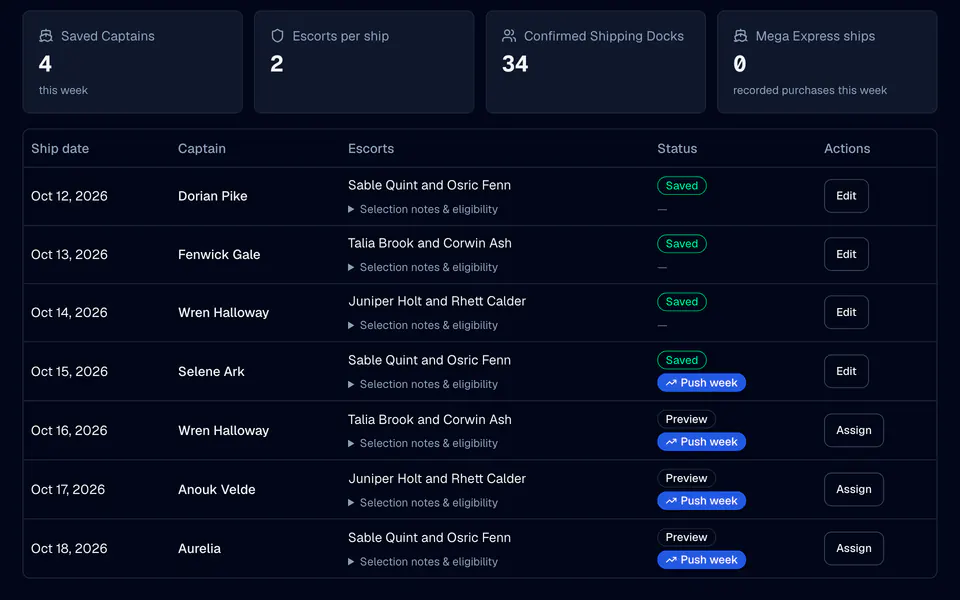
Every Cargo Ship day, planned by your rules.
Alliance Trade replaces the spreadsheet and the late-night chat thread about who sails next. Officers set the rules once; LordTracker does the remembering.
Captain pools
Name up to 20 pools, such as Top hitters, Officers or Donors. A pool can filter by chosen Lords, last week's top VS ranks, R1–R5 rank, VS and donation minimums, last week's targets, battle no-shows and a cooldown in weeks.
A method for each weekday
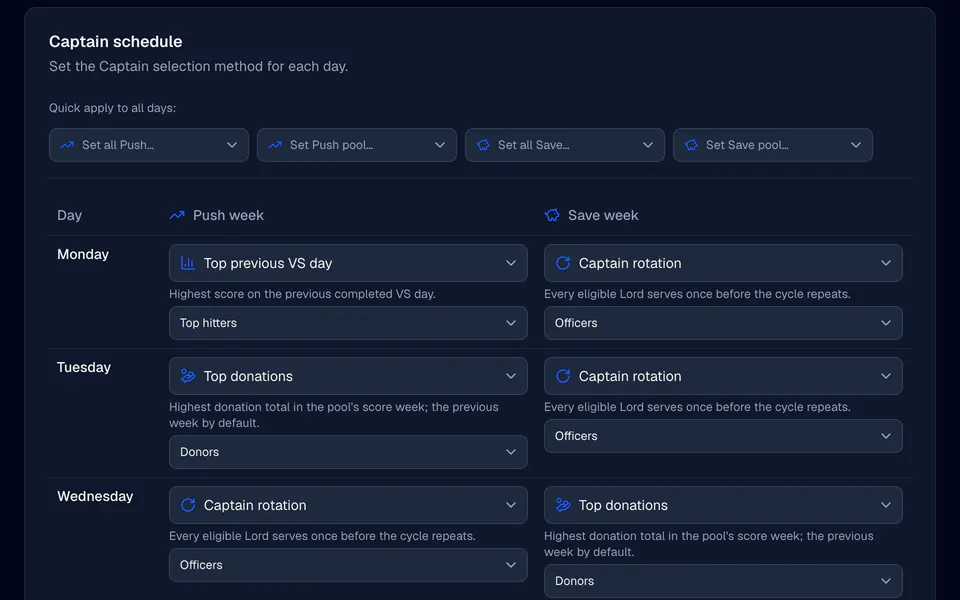
Give every day of the week a method and a pool: Captain rotation, the top score of the previous VS day, top donations, best battle reliability or an officer's manual choice. A day without a method uses the rotation.
Push and Save weeks
Turn on separate Save-week rules and every weekday gets a Save cell next to its Push cell. A week follows its VS week mode, or an officer sets Push or Save for Trade alone without touching the VS plan.
Escort rotation
Put your escort candidates in priority order once. Every saved day moves one continuous rotation on, skipping the Captain, Lords who are absent during preparation and Lords whose Shipping Dock is not unlocked.
Eligibility you can see
Every Lord shows why they can or cannot sail: Shipping Dock, time in the alliance, an absence or an inactive Lord. Officers confirm docks and join times in one eligibility table and save them together.
Mega Express purchases
Record who bought a Mega Express Cargo Ship next to the day's crew, up to the daily limit your alliance sets. A purchase is a record, not a crew role, so any Lord of the alliance can be entered.
Configure once. Review each week.
Confirm the ship and docks
Open Trade rules: confirm that your alliance has the Standard Cargo Ship, set the reset hour and the preparation time, and tick every Lord whose Shipping Dock is unlocked.
Build pools and a schedule
On the Schedule tab, create your Captain pools and give each weekday a method and a pool. Add the Save column if your alliance plays Save weeks differently.
Check the week ahead
Week Ahead lists every day with its Captain, its escorts and the reason for each choice. Choose a Captain where a day needs one, then press Save all days.
Post the roster
Today shows the saved crew. Copy roster puts the day, and Copy all the whole week, on your clipboard in your alliance chat's language.
One rule per weekday, two kinds of week.
The Schedule tab follows how alliances already talk about the ship: who may captain this week, and how today's Captain is chosen from them.
- Quick applySet one method or one pool for a whole column at once, then change the exceptions by hand.
- Rules apply forwardSaving the schedule changes previews and new saves only. Days that are already saved keep their Captain.
- Nothing happens silentlyWhen a pool has nobody eligible or its scores are not recorded yet, the day says so and waits for an officer instead of switching to another rule.
From the forecast to the alliance chat.
Today saves itself
The game appoints a Captain while the ship prepares, for four hours after reset by default. When an officer opens Today during that window and the forecast has a Captain, LordTracker saves the roster once and tells the crew in the app, and by push where they allow it.
A week saved in one step
Save all days stores the browsed week, this week or next, in one go. If another officer changed something in the meantime, nothing is saved and the page shows the new forecast, so you can check it and save again.
Members always know
Members read the schedule. A member whose Lord is linked sees their own Captain and escort days on My Lord, and every Lord profile counts that Lord's past Captain and escort turns.
History you can correct
Record a past day, correct a saved one, or export and import the history as CSV with a preview of new, replaced and unchanged days. An import can be undone for 24 hours in the activity log.
What the planner leaves to the game.
Passengers stay in the game
Passengers and cabins are drawn in Top Lords. LordTracker plans the Captain and the escorts and records Mega Express purchases; it never hands out passenger places.
Defaults you can change
The defaults follow the game as far as we know it: at least 20 alliance members, 24 hours in the alliance, preparation from 00:00 server time for 4 hours and at most 2 Mega Express Cargo Ships a day. Each one is an alliance setting.
Scores come from your records
Score-based methods read your recorded VS points, donation totals and battle attendance. A missing score is never treated as a low one: the day waits for the data or asks an officer.
Questions, answered.
Who chooses the Cargo Ship Captain in LordTracker?
Can Push and Save weeks use different Captain rules?
How does the escort rotation work?
Can members see the Cargo Ship schedule?
Is the Cargo Ship planner included in every plan?
More from LordTracker.
Public Top Lords rankings
Explore tracked kingdoms
Recently updated alliance and Lord rankings from official captures.
Plan your next Cargo Ship week. Your kingdom, in sync.
Start the 7-day Pro trial, pick your alliance and open Alliance Trade. Members and officers are unlimited and free on every plan.