Top Lords battle planner. Rosters, roles, results.
Plan every alliance battle in one place. Collect who can play, build the roster from a suggestion you can edit, put Lords on objectives on a tactical board, then record attendance and points, so the next roster is fairer than the last.
- Gold Mine Conquest built in, or your own battle types
- Rosters from member availability
- Tactical board with objective priorities
- Attendance, scores and reliability per Lord
- 7-day Pro trial, no card
- Members and officers free
- From €14.99 / month
- Cancel anytime
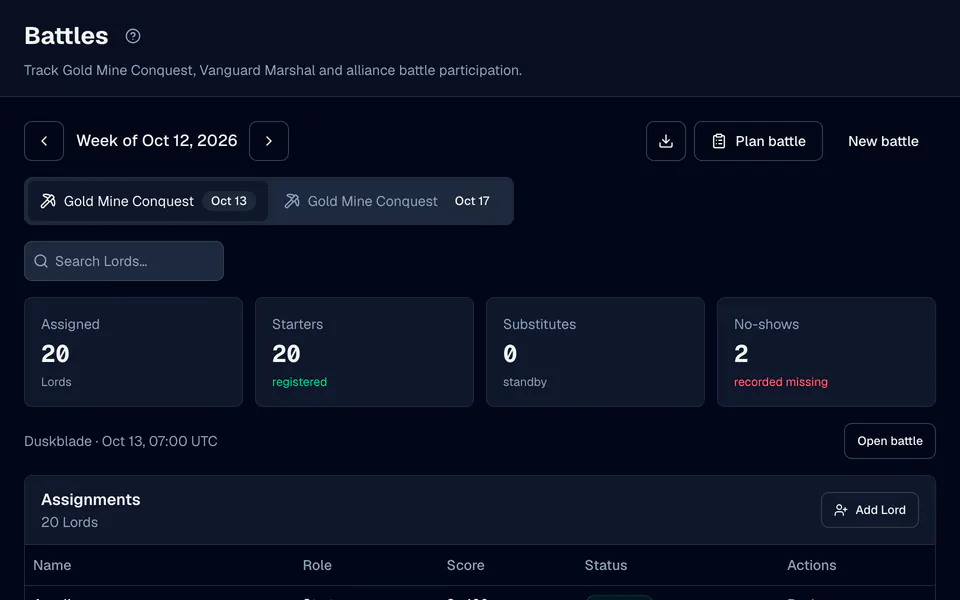
One battle, from sign-up to score.
Battle types
Gold Mine Conquest comes ready: 20 registered Lords, no substitutes and Battlefield Points as the score. Add your own types with capacities, substitutes, team names, a score label and up to 40 objectives.
Member answers
Members answer Available, Maybe or Unavailable for each upcoming battle on My Lord, with an optional note. Officers see every answer next to the roster.
Suggested rosters
Suggest roster fills the open places from available members, ordered by R1–R5 rank and the strength you choose: Lord power, hero power or a squad's power. Teams are balanced when the battle type has them.
Roster templates
Save a roster that worked as a template for its battle type and load it for the next battle. Missing or inactive Lords are flagged before anything is saved.
Tactical planner
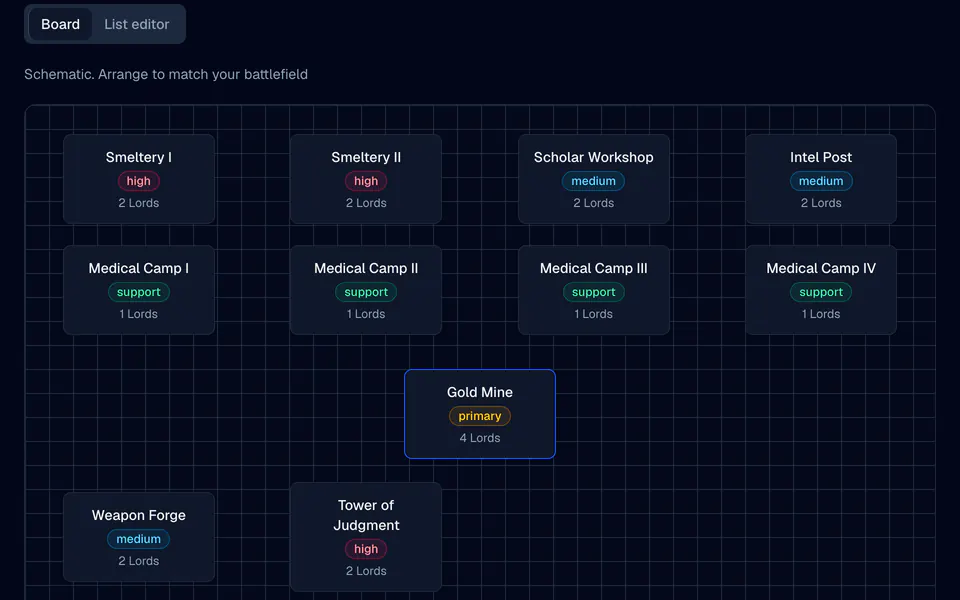
Place the roster on a board of objectives. Give each objective a priority from primary to support and drag Lords onto it, or preview an automatic assignment by strength.
Attendance and reliability
After the battle, record Attended, No-show or Excused and each Lord's score in one table. Reliability is the share of battles a Lord attended among recent ones with a known result.
From sign-ups to Battlefield Points.
Create the battle
Choose the battle type, the date and time in UTC and the opponent. Members see the battle on My Lord and can answer whether they can play.
Build the roster
Press Suggest roster, adjust the draft, then Review and save roster. Every Lord whose place changed gets a notice in the app.
Assign objectives
Open the tactical planner, put Lords on objectives and save the plan. Share with members publishes it, and each Lord sees their own objective.
Record the result
Enter win, loss or draw with both scores, then attendance and points for each Lord, by hand, from a CSV file or from reviewed screenshots.
A battle plan everyone can read.
Gold Mine Conquest starts with its facilities on the board: the Gold Mine, Smeltery I and II, the Scholar Workshop, the Intel Post, Medical Camps I to IV, the Weapon Forge and the Tower of Judgment.
- Priorities that weighPrimary, high, medium and support objectives get different shares of your strength when you preview auto-assign.
- Locks and exceptionsLock an objective to keep its Lords, or leave it out of auto-assign, and the preview fills the rest.
- Members see their partA shared plan shows each assigned Lord their own objective and priority. Officer notes stay private.
Fair rosters keep players playing.
Availability first
Asking in chat who can play loses answers. Here every answer is stored with its battle, and only Lords who said Available are suggested. Officers can still add anyone by hand.
Reliability you can show
When a Lord asks why they were left out, the record shows their recent attendance. Excused absences and unknown results never count against anyone.
Scores that add up
Points stay per battle and per Lord, so profiles show recorded scores next to attendance without mixing different kinds of score.
Calendar and wars
Link a battle to a calendar event for sign-up slots and reminders, and follow longer conflicts as war events with opponents, fights and before-and-after readings.
What the planner does not guess.
A schematic board
The board is a neutral grid of objectives that you arrange to match the battlefield. It contains no game map art and no game rules beyond the facilities' names.
You record the outcome
LordTracker does not read battle results from the game by itself. Officers record them, and a score alone never marks a Lord as present.
Questions, answered.
Does LordTracker support Gold Mine Conquest?
How are battle rosters suggested?
Can members see the battle plan?
How is battle reliability calculated?
Can I import battle results?
More from LordTracker.
Public Top Lords rankings
Explore tracked kingdoms
Recently updated alliance and Lord rankings from official captures.
Plan your next battle. Your kingdom, in sync.
Start the 7-day Pro trial, pick your alliance and open Battles. Gold Mine Conquest is ready to use, and members and officers are free.