Top Lords donation tracker. Every contribution counted.
Record each Lord's weekly donation total, compare it with your alliance target and see who is on pace before the week ends. Totals come from screenshots, CSV files or manual entry, and every correction is kept in the activity log.
- Weekly totals per Lord
- An alliance target with personal overrides
- Pace and projection mid-week
- Grades together with VS
- 7-day Pro trial, no card
- Members and officers free
- From €14.99 / month
- Cancel anytime
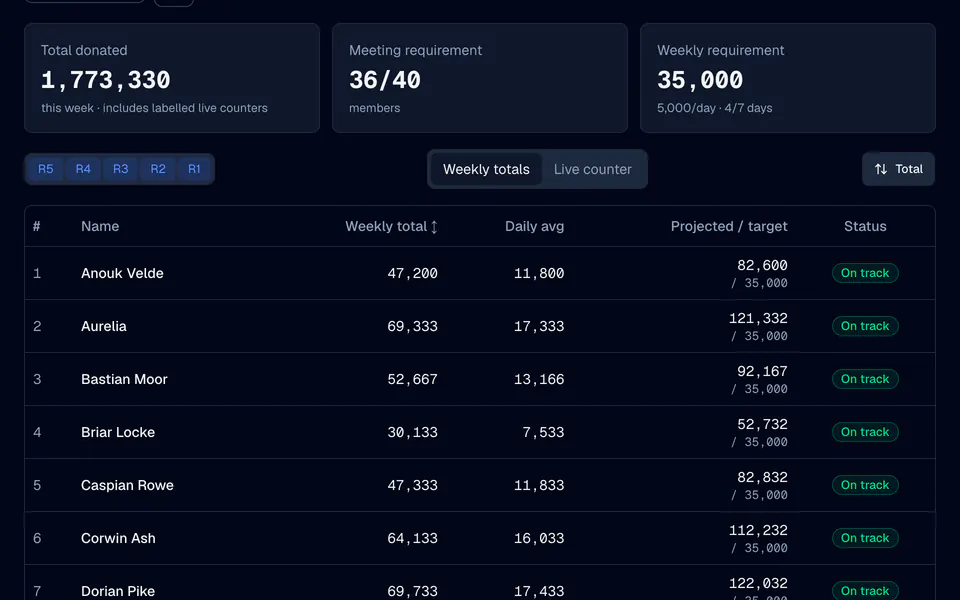
Donations, week by week.
Final weekly totals
One reviewed total per Lord and week, kept apart from VS and roster data. A blank stays unknown; only an entered 0 means zero.
Targets
Set an alliance weekly target, 35,000 out of the box, and personal targets for Lords with a different role. A Lord without a target keeps their total without a grade.
Pace and projection
Mid-week, compare each Lord with the share of the target due so far, and see where they will land at their current rate.
Three ways in
Type totals in, preview and apply a CSV file, or import the weekly donation screen as a screenshot and confirm it as the final total.
Live counters
With auto-sync, the dashboard shows dated live donation counters from synced rosters. They stay samples until an officer confirms a final total.
Corrections with history
Changing or clearing a total keeps the old and the new value in the activity log, and imports can be undone for 24 hours.
Set a target, then check the week.
Set the target
In Settings, Performance, set the weekly donation target and any personal targets. The donation week resets with your VS week, at 00:00 UTC by default.
Record the week
Import the weekly donation ranking or a CSV file, or type the totals in. Choose the week, match the Lords and confirm before anything is saved.
Read pace and grades
Switch between the pace and the full-week view. Performance combines donations with VS into one weekly grade, with the weights you choose.
Compare and reward
Put two weeks side by side in Compare, follow streaks over the last 12 completed weeks, and use donations in Cargo Ship Captain pools.
Donations and VS in one grade.
Performance turns recorded donations and VS points into one weekly grade per Lord, with the targets, weights and absence rules your alliance sets.
- Weights you chooseGive donations and VS the weights that match your alliance's priorities, or switch a metric off.
- Absences excusedRecorded absences can excuse a week, so a Lord on holiday is not graded as a miss.
- Missing is not a missA week without a recorded total stays ungraded instead of failing.
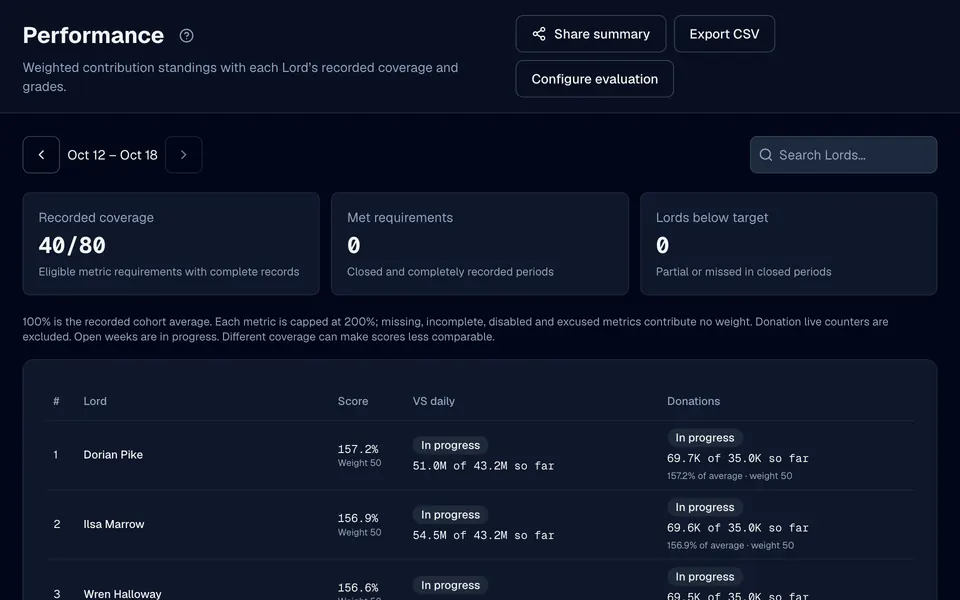
Fair recognition starts with a record.
See the quiet contributors
Some Lords donate every day without saying a word. A weekly record makes their contribution visible to officers and to themselves.
Talk about numbers
When a target is missed, the conversation can start from the recorded total, the target and the pace, all with dates, instead of impressions.
Reward with Cargo Ship turns
Captain pools can require last week's donation minimum or rank Lords by their donations, so the reward follows the work.
Follow the trend
Compare weeks and streaks to see whether a Lord is settling in, slowing down or back on track.
Questions, answered.
Does auto-sync record donation totals?
What donation target does LordTracker use?
What happens when a donation total is missing?
Can I import donations from screenshots?
Can donations decide who captains the Cargo Ship?
More from LordTracker.
Public Top Lords rankings
Explore tracked kingdoms
Recently updated alliance and Lord rankings from official captures.
Count this week's donations. Your kingdom, in sync.
Start the 7-day Pro trial, pick your alliance and record your first donation week. Members and officers are free on every plan.