Top Lords Base Planner Guide
Set up the base planner grid, place alliance buildings, auto-assign Lords around them, import coordinates and share the plan with members.
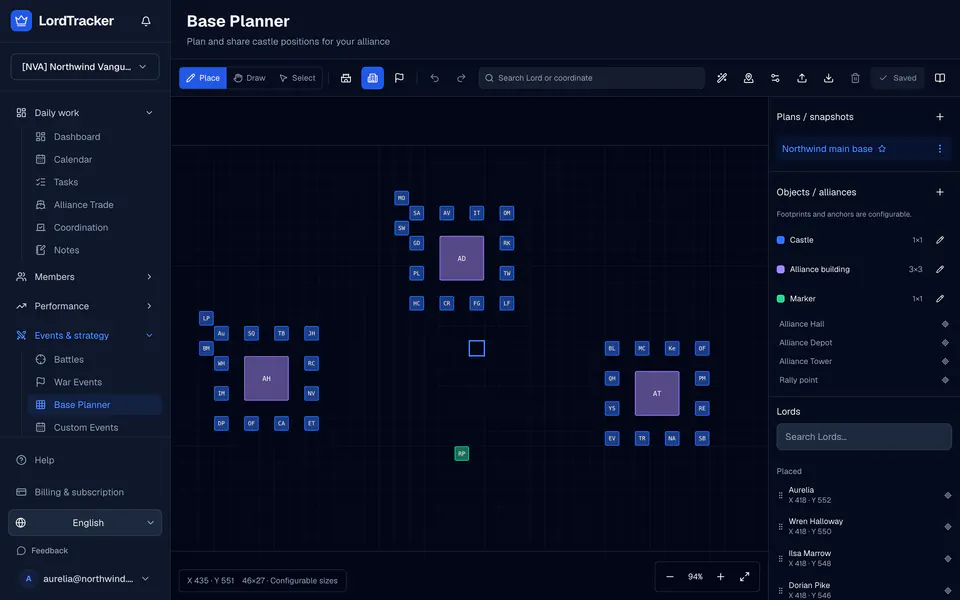
The base planner arranges castles and alliance buildings on a coordinate grid. Use the free base planner in your browser without an account, or Base Planner under Events & strategy to save plans with your alliance's roster.
1. Set up the grid
A plan starts at 120 by 120 cells; each side can be 5 to 240 cells. The origin is the bottom-left game cell: X grows to the right and Y grows upward, as in the game. Set the origin's game coordinate, or anchor any placed object to a coordinate you know and the whole grid follows.
2. Define your objects
The planner starts with neutral sizes: a 1×1 castle, a 3×3 alliance building and a 1×1 marker. They are planning sizes, not measured game geometry. Change names, footprints, colours and anchors to match what your alliance uses. Editing a definition affects new placements; objects already placed keep their footprint.
3. Place buildings and Lords
Use Place to put objects on the grid, Draw to pan and Select to move or delete. Search a Lord or a coordinate to jump to it. Drag a Lord from the sidebar onto the grid, or use the arrow keys and Enter to place the chosen object.
4. Let the planner suggest positions
Auto-assign unplaced Lords places active Lords who have no spot yet around a chosen object, ordered from R5 to R1 and then by Lord power or hero power. Castles that are already placed never move. Vacancy refill puts unplaced Lords into the spots of Lords who left, and relocation proposes the shortest legal move for one Lord. Every suggestion is a preview: confirm it, then save the plan.
5. Import and export coordinates
Export JSON for a full backup, PNG for your alliance chat and CSV with Name, Lord ID, X and Y. Imports of CSV or JSON are reviewed: only exact names, aliases or game IDs match on their own, and other rows need your choice or are skipped. Collisions, duplicates and coordinates outside the grid block the import. An alliance import can be undone for 24 hours in the Activity log.
6. Save and share
In the free tool, plans are stored in your browser on that device; export JSON to keep them. In your alliance, officers save several plans, rename, duplicate and archive them, and choose the default. Members read the default plan, on a phone as a list of coordinates, and a verified Lord sees their own coordinate on My Lord.
The base planner page has the overview. To see where castles really are today, use the kingdom map guide.